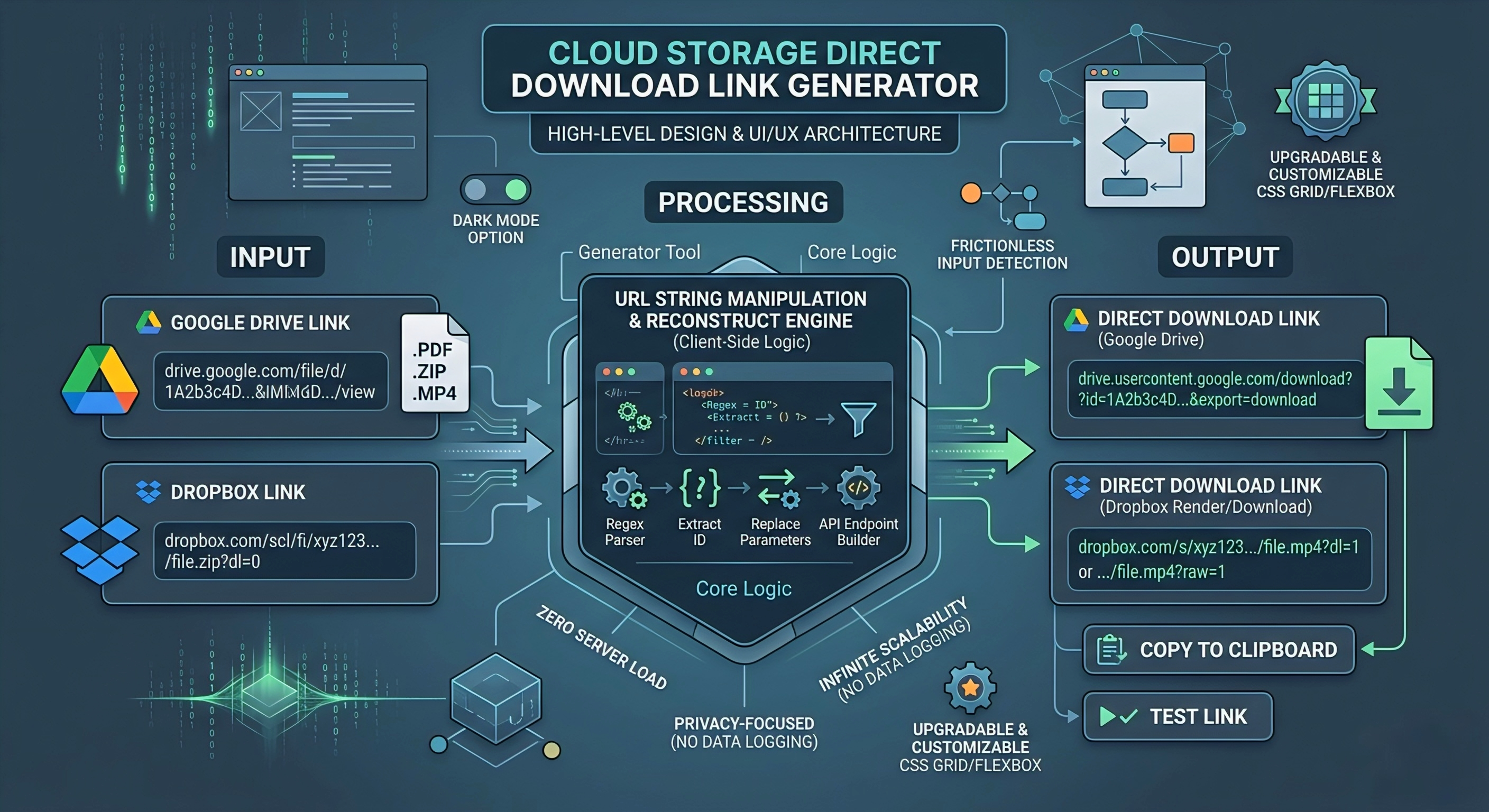
If you are building automation workflows, integrating cloud storage solutions, or developing a custom SaaS platform, you already know that dealing with standard file-sharing links is a massive headache. Standard links from Google Drive and Dropbox force users onto a web-based preview UI. This completely breaks programmatic file downloads, <audio>/<video> HTML tags, and custom API integrations.
For developers and site owners looking to streamline file delivery, building a Direct Download Link Generator Tool is the most efficient fix. This post breaks down the high-level design, the URL string manipulation logic, and the UI/UX architecture required to build a scalable, client-side tool for your own platform.
Why Standard Links Fail in Production
When a user clicks a standard sharing link, the server responds with a 302 Redirect. Instead of serving the raw file data (like a .zip, .mp4, or .pdf), the cloud provider redirects the HTTP client to an HTML page containing their proprietary document viewer.
If you are building a custom front-end that relies on fetching assets directly from a drive, this redirect blocks your request due to CORS (Cross-Origin Resource Sharing) policies. A direct download link bypasses this web interface entirely, forcing the server to output the raw file stream. This is an absolute necessity for B2B software, podcast hosting, and logistics platforms that require immediate file access.
The Core Logic: URL String Manipulation
You do not need to deploy complex web hosting infrastructure or backend microservices to build this generator. The core logic relies entirely on client-side JavaScript, utilizing simple Regular Expressions (Regex) and string manipulation.
When a user pastes a URL, your script intercepts it, extracts the unique file identifier, and reconstructs it into a direct download API endpoint. Here is a breakdown of how the URL structures must be transformed:
| Storage Provider | Standard Share Link Format | Direct Download URL Format | Technical Mechanism |
|---|---|---|---|
| Google Drive | …/file/d/[FILE_ID]/view | drive.usercontent.google.com/download?id=[FILE_ID]&export=download | Bypasses 302 redirects, forces raw file download. |
| Google Drive (Legacy) | …/open?id=[FILE_ID] | drive.google.com/uc?export=view&id=[FILE_ID] | Uses the older User Content (/uc) endpoint. |
| Dropbox (Download) | …/scl/fi/[ID]/file.zip?dl=0 | …/scl/fi/[ID]/file.zip?dl=1 | Alters the parameter from 0 to 1 to trigger download. |
| Dropbox (Render) | …/s/xyz123/file.mp4?dl=0 | …/s/xyz123/file.mp4?raw=1 | Uses raw=1 to force browser rendering (ideal for media). |
From an architectural standpoint, keeping this tool 100% client-side is the smartest move for several reasons:
- Zero Server Load: By building this in vanilla JavaScript, React, or Vue, the processing happens entirely in the user’s browser runtime. You eliminate the need for Node.js, Python, or database hosting, keeping overhead costs at zero.
- Privacy-Focused Model: Enterprise clients and developers are paranoid about data leaks. A client-side generator ensures their private file URLs are never transmitted to your backend. You can market this as a completely incognito, secure workflow tool where no data is logged.
- Infinite Scalability: Since there is no backend querying or API rate limiting to worry about, the tool scales infinitely. Whether your site gets 100 or 100,000 daily active users, your server performance remains unaffected.
UI/UX Architecture & Modern CSS Strategy
A highly functional script is useless if the UI/UX feels like it was built in 2010. To capture and retain users, the interface must be frictionless and visually sharp.
- Frictionless Inputs: Use a single, prominent text input field that auto-detects whether the pasted link is from Google Drive or Dropbox. Do not force the user to select the platform manually from a dropdown menu.
- Modern CSS Properties: Ditch the heavy UI libraries and rely on modern native CSS. Utilize CSS Grid for the layout structure and Flexbox for component alignment. Implement CSS custom properties (var(–bg-color)) so you can easily deploy a Dark Mode toggle—a mandatory feature for any developer-facing application.
- Micro-interactions & State Management: When the user clicks “Convert,” prevent default form submission to avoid page reloads. Render the new link instantly below the input with a one-click “Copy to Clipboard” button. Trigger a temporary toast notification (“Link Copied to Clipboard!”) using a simple CSS transition to confirm the action.
Building a Google Drive and Dropbox direct download link generator is the perfect lightweight project for your site. It requires minimal code but solves a critical bottleneck for automation tools and web developers. Focus on a responsive CSS layout, ensure the JavaScript logic runs entirely in the browser for maximum privacy, and you will have a high-traffic, highly monetizable utility ready to scale.
Leave a Reply